Introduction:
If you’ve spent any time researching how to make your business run more efficiently, you’ve almost certainly bumped into two terms that seem to get used interchangeably workflow automation and AI agents. They both promise to save time, reduce manual effort, and eliminate the mind-numbing repetitive tasks that drain your team’s energy. They both live under the sprawling umbrella of “automation.” And they both have legitimate, powerful use cases across nearly every industry.
But they are not the same thing. Not even close.
Conflating workflow automation and AI agents is a bit like confusing a conveyor belt with a factory manager. Both help move things along. Both exist to improve output. But one follows a fixed track and the other makes judgment calls. Understanding which one you need and when could be the difference between a smooth digital transformation and a costly, frustrating technology misstep.
This guide breaks down workflow automation vs AI agents in plain language. We’ll cover how each works, where each thrives, where each falls short, and most importantly how to decide which one (or which combination) makes sense for your business right now.
Whether you’re a startup founder trying to scale without bloating headcount, an operations manager tasked with cutting costs, or a technology leader evaluating your automation stack, this article is written for you. If you’d like to explore how these solutions are implemented in practice, visit our Services page to see the full range of AI and automation capabilities we offer.
What Is Workflow Automation?
Workflow automation is the use of software to execute a defined sequence of tasks automatically, based on preset rules and triggers, without requiring human intervention at each step.
Think of it as giving your processes a script. You define the steps, you set the conditions, and the system follows through every single time. No deviation. No creativity. No guesswork. Pure, reliable execution.
How Workflow Automation Works
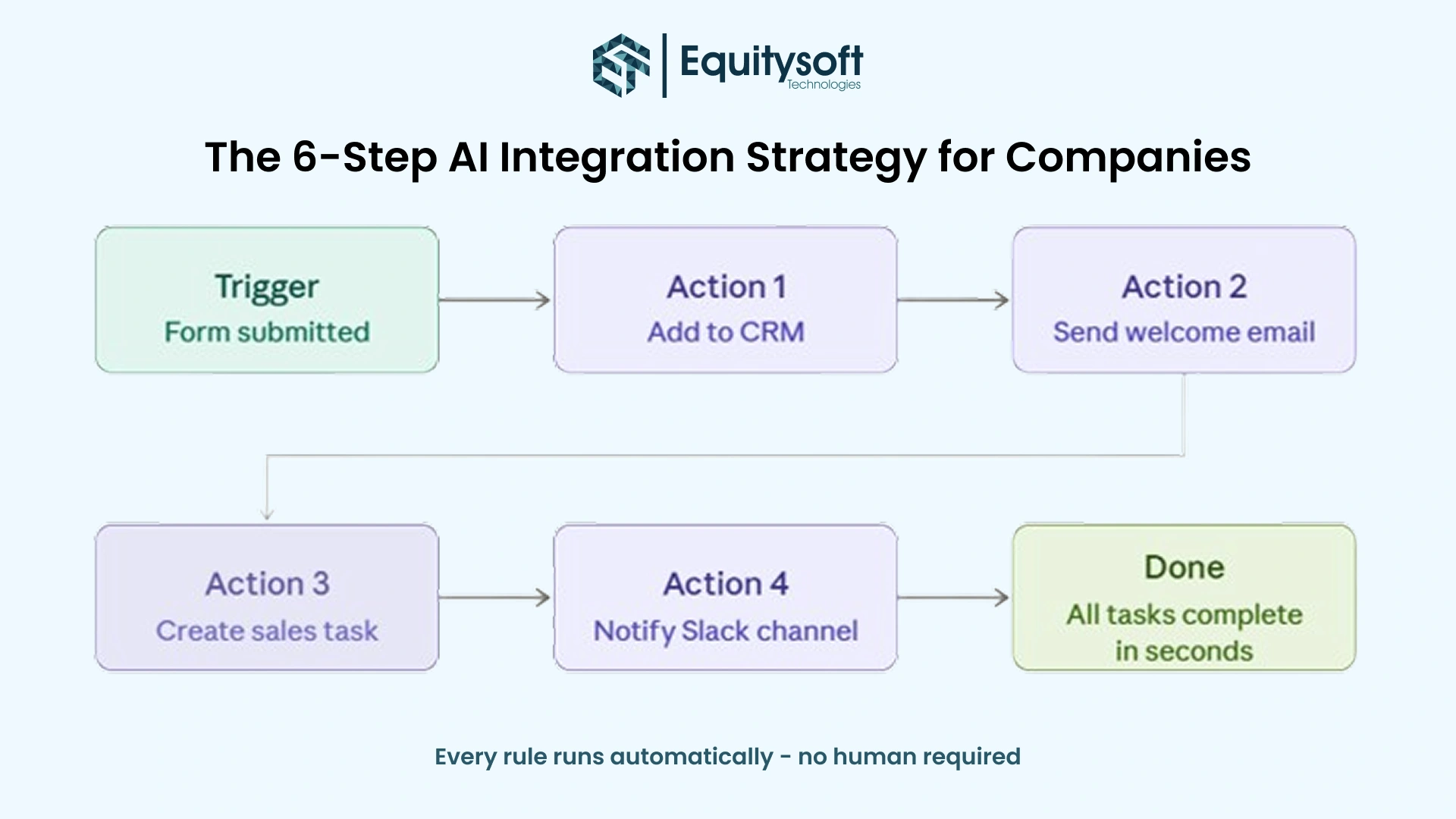
At its core, workflow automation operates on an “if this, then that” logic. A trigger event initiates the workflow, and the system executes a predetermined chain of actions in response.
For example:
Trigger A new lead fills out a contact form on your website.
- Action 1 The lead’s information is added to your CRM.
- Action 2 A welcome email is sent automatically.
- Action 3 A task is created and assigned to a sales rep.
- Action 4 A Slack notification is sent to the sales team channel.
All of this happens instantly, every time, without a human touching a single button. The rules are set once. The system runs indefinitely.
Common Workflow Automation Tools
The market for workflow automation tools is mature and well-populated. Some of the most widely used platforms include:
- Zapier connects thousands of apps via no-code “Zaps” (trigger-action pairs).
- Make (formerly Integromat) A more visual, flexible automation platform for complex multi-step workflows.
- Microsoft Power Automate: Deep integration with the Microsoft 365 ecosystem.
- n8n An open-source workflow automation tool favored by developers and technical teams.
- HubSpot Workflows: CRM-native automation for marketing and sales processes.
- Salesforce Flow: Enterprise-grade automation built into the Salesforce platform.
What Workflow Automation Does Well
Workflow automation is exceptionally good at tasks that are:
Repetitive and high-volume. If your team sends 200 follow-up emails per week using the same template, that’s a workflow automation job not a human job.
Rule-based and predictable. When the logic is clear and unchanging (“If invoice is overdue by 30 days, send a reminder”), automation handles it flawlessly.
Time-sensitive. Automation never sleeps. It triggers instantly at midnight on a Sunday, the same way it does at noon on a Tuesday.
Prone to human error. Data entry, file routing, and notification sending these tasks invite mistakes when humans do them manually, especially at volume. Automation eliminates that risk.
Compliance-dependent. In regulated industries, workflow automation creates an auditable, consistent trail of actions every record updated, every notification sent, logged, and timestamped.
Where Workflow Automation Falls Short
Workflow automation has one fundamental limitation: it cannot handle situations it wasn’t programmed for.
The moment something falls outside the defined rules, automation breaks down. A form submission with an unusual field value. A customer query that doesn’t match any of your pre-set categories. An exception that requires context, judgment, or nuance to resolve properly.
Automation also can’t learn. Run the same workflow for five years, and it will perform the same on day 1,825 as it did on day one for better or worse. If the world around it changes (and it always does), someone has to update the rules.
What Are AI Agents?
AI agents are software systems powered by large language models (LLMs) or other artificial intelligence that can perceive their environment, reason about it, plan a course of action, and take steps autonomously to achieve a goal including adapting when things don’t go as expected.
This is a fundamentally different paradigm. Where workflow automation follows a script, an AI agent figures out the script as it goes.
How AI Agents Work
AI agents typically operate through a loop:
- Perceive The agent receives input (a user request, a data feed, a task description).
- Reason The agent uses an LLM or reasoning engine to understand the context, identify what needs to happen, and form a plan.
- Act The agent uses tools (web search, code execution, API calls, database access) to take steps toward the goal.
- Observe The agent evaluates the outcome of its actions.
- Iterate If the goal isn’t met, the agent adjusts its approach and tries again.
This loop can run autonomously, with little or no human involvement or it can involve a “human in the loop” at key decision points for oversight and course correction.
The Role of LLMs and Tool Use
Modern AI agents are almost always built on foundation models large language models like GPT-4, Claude, or Gemini that give them the ability to understand natural language, reason through complex problems, and generate coherent plans and responses.
What makes agents more than just chatbots is tool use: the ability to take actions beyond text generation. An AI agent equipped with the right tools can:
- Search the web for real-time information
- Read and write files
- Execute code
- Send emails or messages
- Query databases
- Call APIs
- Browse websites
- Fill out forms
- Manage calendars
When you combine reasoning with action, you get a system that can tackle genuinely complex, open-ended tasks. To understand how AI agent development fits into a broader technology strategy, visit our homepage for an overview of how we approach intelligent automation for businesses.
Types of AI Agents
The AI agent landscape is evolving rapidly. At a high level, agents fall into a few categories:
Task-specific agents are built for a narrow purpose a customer support agent, a coding assistant, a research agent. They’re focused but powerful within their domain.
Multi-agent systems involve multiple specialized agents collaborating. One agent might research a topic, another writes a report, a third fact-checks it. The agents hand off work to each other like a well-coordinated team.
Autonomous agents are designed to run with minimal human oversight, pursuing complex, multi-step goals over extended periods. These are the most powerful and the most challenging to deploy safely.
Common AI Agent Platforms and Frameworks
- OpenAI Assistants API A platform for building agents with memory, tool use, and file access.
- LangChain / LangGraph Open-source frameworks for building LLM-powered agents.
- AutoGPT / BabyAGI Early autonomous agent frameworks that inspired the current generation.
- Claude (Anthropic) Widely used in agentic applications, including enterprise deployments and developer tooling.
- Vertex AI Agent Builder (Google) Enterprise-grade agent development on Google Cloud.
- Microsoft Copilot Studio Microsoft’s platform for building custom AI agents integrated with the Microsoft ecosystem.
- CrewAI A framework for orchestrating multiple AI agents working as a collaborative crew.
What AI Agents Do Well
AI agents shine in scenarios that demand:
Judgment and reasoning. When the right answer isn’t obvious and requires weighing multiple factors, an AI agent can think through the problem rather than crashing on an undefined rule.
Handling unstructured information. Emails, PDFs, web pages, meeting transcripts, support tickets AI agents can read, interpret, and act on information in any format.
Adaptive problem-solving. If the first approach doesn’t work, an AI agent can try something else. This makes them effective for tasks with multiple valid paths to completion.
Natural language interfaces. AI agents can receive instructions in plain English (or any other language) without requiring rigid input formats.
Research and synthesis. Gathering information from multiple sources, comparing options, and summarizing findings these tasks map naturally to what LLMs do well.
Long-horizon tasks. An AI agent can work on a task that takes dozens of steps over an extended period, maintaining context throughout.
Where AI Agents Fall Short
Despite their impressive capabilities, AI agents have real limitations that anyone considering deployment must understand:
Reliability is not guaranteed. Unlike workflow automation (which either works or throws an error), AI agents can produce plausible-sounding but incorrect outputs. This is especially dangerous in high-stakes or compliance-sensitive environments.
Cost. Every inference call to an LLM costs money. For high-volume, repetitive tasks, using an AI agent instead of simple workflow automation is like hiring a lawyer to process routine paperwork; technically possible, but wildly inefficient.
Latency. AI agents take time to reason. Workflow automations that complete in milliseconds might take an AI agent several seconds or even minutes to finish.
Unpredictability. This is the flip side of adaptability. Because agents reason rather than follow scripts, their behavior can be surprising, which creates challenges for quality control and auditing.
Privacy and security risks. AI agents that access sensitive data and take real-world actions need careful security design. The attack surface for prompt injection and data leakage is real.
Workflow Automation vs AI Agents: A Direct Comparison
To make the distinction concrete, here’s a side-by-side comparison across the dimensions that matter most for business decision-making:
- Dimension Workflow Automation AI Agents
- Core Mechanism Rule-based, trigger-action logic LLM reasoning + tool use
- Handles exceptions, no breaks on edge cases, yes, adapts to novel situations
- Learns Over Time, No Limit (depends on implementation)
- Processes Unstructured Data Limited Yes natively
- Speed Very fast (milliseconds) Slower (seconds to minutes)
- Cost Per Task Low Higher
- Reliability / Consistency Very high deterministic Variable probabilistic
- Setup Complexity Moderate High
- Auditability Excellent Moderate to poor
- Best For Repetitive, rules-based tasks. Complex, judgment-intensive tasks
- Example Tools: Zapier, Make, Power Automate, LangChain, OpenAI Assistants, Claude
Real-World Use Cases: Workflow Automation in Action
Let’s ground this in concrete examples. These are scenarios where workflow automation is the right and clearly superior choice:
1. Lead Nurturing Sequences
A SaaS company captures a free trial signup. Workflow automation immediately creates a CRM record, enrolls the lead in a 7-email nurturing sequence, sets up a task for an SDR to call on day 3, and alerts the sales Slack channel. This happens thousands of times per month, perfectly and instantly.
2. Invoice Processing
An accounts payable team receives vendor invoices via email. Workflow automation parses the attachment, extracts the data fields, creates a record in the accounting system, routes it for approval based on dollar amount, and sends a confirmation to the vendor. No human touches it unless there’s an approval decision to make.
3. Employee Onboarding
When HR marks a new hire as active in the HRIS, workflow automation triggers a cascade: IT gets a ticket to provision accounts, the manager gets a checklist, the new employee receives welcome materials, payroll is notified, and a 30/60/90-day check-in schedule is created, all before the person’s first day.
4. E-commerce Order Fulfillment
An online order triggers inventory checks, payment verification, shipping label generation, warehouse pick lists, carrier notifications, and customer confirmation emails automatically from a single purchase event.
5. Social Media Scheduling
Marketing teams use workflow automation to publish content across platforms on a schedule. Content is prepared once and automatically published at optimized times without manual intervention.
Real-World Use Cases: AI Agents in Action
Now here’s where AI agents show their value: tasks that would stumble or fail with rules-based automation:
1. Customer Support Triage and Resolution
An AI agent reads incoming support tickets in natural language, understands the issue, checks the customer’s account history, looks up relevant knowledge base articles, drafts a resolution, and either sends it automatically for routine issues or escalates with a summary for complex ones. It handles the 80% of tickets that follow patterns and flags the 20% that don’t.
2. Competitive Intelligence Research
A marketing team asks an AI agent to monitor competitor websites, press releases, job postings, and industry news then synthesize a weekly briefing that highlights strategic changes and emerging threats. No human could track this volume of signals across this many sources.
3. Code Review and Bug Fixing
A developer submits a pull request. An AI agent reviews the code, identifies bugs and style violations, suggests improvements with explanations, and can even implement fixes all within the CI/CD pipeline.
4. Contract Analysis
A legal or procurement team receives a 60-page vendor contract. An AI agent reads the entire document, flags non-standard clauses, compares terms against the company’s standard agreement, and generates a redline with suggested changes in minutes rather than hours.
5. Sales Research and Personalization
Before a high-stakes sales call, an AI agent researches the prospect: company news, recent press releases, LinkedIn activity, industry trends, and the prospect’s public statements. It synthesizes a personalized briefing doc with talking points, potential pain points, and strategic conversation hooks.
6. Dynamic Report Generation
An operations agent pulls data from multiple sources (CRM, analytics, finance systems), interprets trends, generates narrative insights, and produces a formatted executive report, not just a data dump, but an actual analysis with recommendations.
For a deeper look at how these use cases translate into real implementations, explore our blog for case studies, tutorials, and industry-specific insights on AI and automation.
The Hybrid Approach: When You Need Both
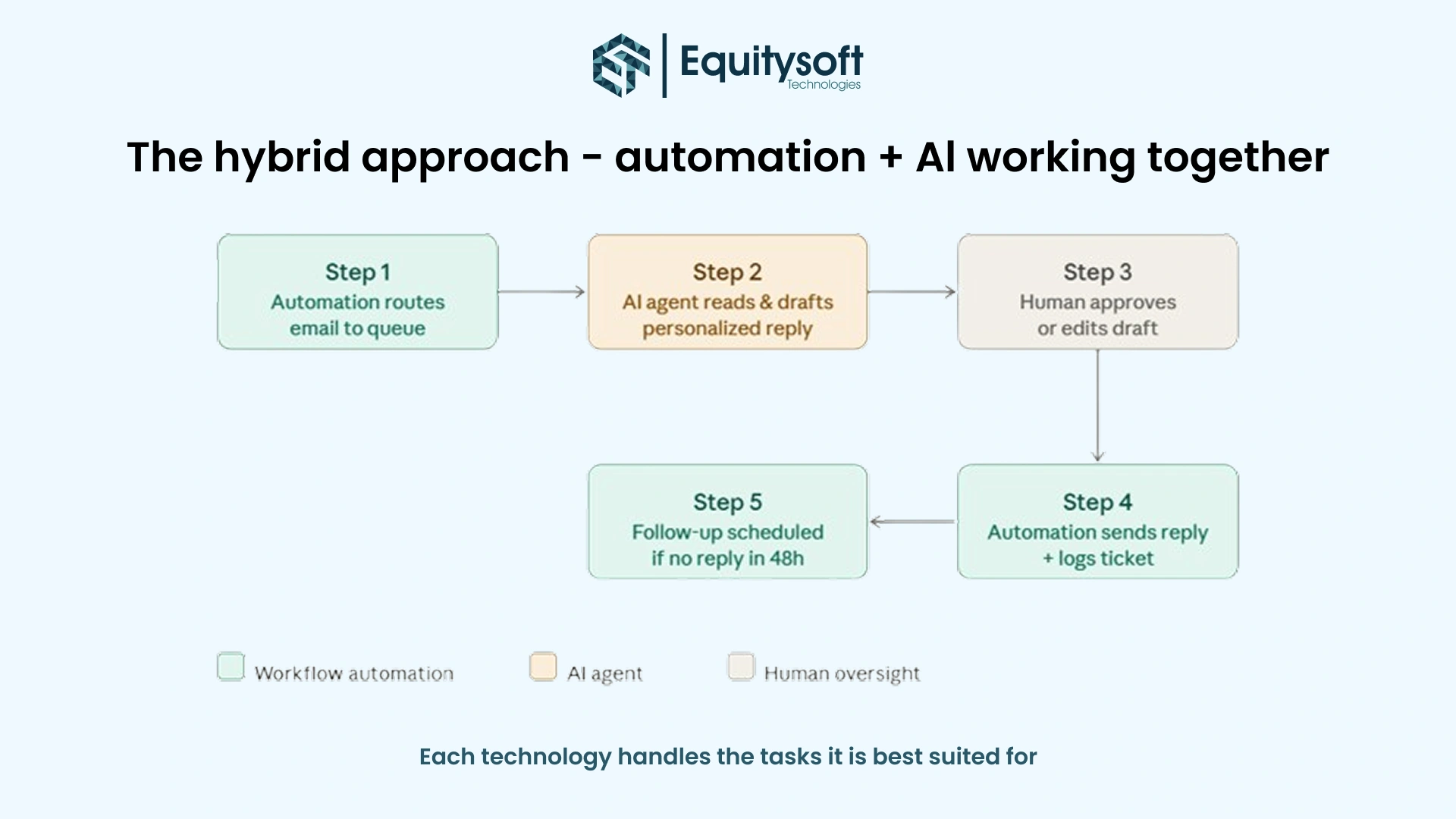
Here’s a nuance that’s often missed in the automation vs. agents debate: the most powerful enterprise automation architectures use workflow automation and AI agents together, each doing what it does best.
Consider a customer service pipeline:
- Workflow automation handles routing: new email arrives → classified by topic → routed to correct queue → ticket created in help desk system.
- AI agent handles the response: reads the ticket, understands the issue, checks account history, generates a draft reply, and flags if escalation is needed.
- Workflow automation handles the send: approved reply goes out → ticket status updated → follow-up scheduled if no response in 48 hours.
The structured, deterministic parts are handled by automation. The agent handles the parts that require reading, reasoning, and writing. The result is faster, smarter, and more scalable than either approach alone.
This pattern, automation as the plumbing, agents as the intelligence, is rapidly becoming the standard architecture for sophisticated business automation. If you’re considering a hybrid system for your organization,reach out via our contact page to discuss your requirements with our team.
How to Decide: A Framework for Choosing the Right Tool
When evaluating whether a task is better suited to workflow automation or an AI agent, work through these five questions:
Question 1: Is the logic fully definable?
Can you write down every condition and every possible outcome in advance? If yes, workflow automation is likely sufficient. If there are edge cases you can’t predict or exceptions that require interpretation, consider an agent.
Question 2: What kind of data is involved?
Is the data structured (form fields, database records, spreadsheet rows)? Workflow automation handles it well. Is the data unstructured (emails, documents, conversations, images, web pages)? You need an AI agent’s ability to interpret natural language and context.
Question 3: How important is consistency?
If you need to guarantee the same output every single time critical in finance, healthcare, compliance, or legal contexts, lean toward workflow automation, which is deterministic by design. AI agents introduce variability that requires careful management.
Question 4: What is the cost tolerance?
High-volume, low-complexity tasks are almost always better served by workflow automation from a pure cost perspective. AI agents should be reserved for tasks where their reasoning capability justifies the higher inference cost.
Question 5: What happens when it goes wrong?
With workflow automation, failures are usually explicit and detectable when
the automation fails and throws an error. With AI agents, failures can be subtle. The agent completes the task but gets something wrong. What’s the cost of an undetected error in this context?
Industry-Specific Guidance
Financial Services
Workflow automation, transaction processing, compliance reporting, KYC document routing, and alert notifications.
AI agents: fraud pattern detection, regulatory document analysis, client communication drafting, and investment research summarization.
Healthcare
Workflow automation: Appointment scheduling, insurance verification, prescription routing, EHR data entry.
AI agents for clinical note summarization, diagnostic support, patient communication, prior authorization appeals.
E-commerce and Retail
Workflow automation: Order fulfillment, inventory alerts, returns processing, loyalty point calculation.
AI agents: Customer service, product description writing, demand forecasting narrative, personalized recommendations.
Professional Services (Legal, Accounting, Consulting)
Workflow automation: Billing triggers, document routing, client onboarding checklists, and deadline reminders.
AI agents: Contract analysis, research synthesis, proposal generation, compliance monitoring.
Software and Technology
Workflow automation, CI/CD pipelines, bug ticket routing, deployment notifications, and SLA monitoring.
AI agents: Code review, documentation generation, incident analysis, feature ideation.
To see how these capabilities are delivered in practice, view our full services offering for a breakdown of our technology expertise across industries.
Implementation Considerations
Starting with Workflow Automation
If you’re new to automation, workflow automation is the right starting point for most organizations. Here’s why:
It’s accessible. Tools like Zapier and Make are genuinely no-code and can be set up in hours, not months. The learning curve is shallow. The ROI is immediate and measurable.
It’s safe. Because the behavior is deterministic and auditable, workflow automation introduces minimal risk. You know exactly what it will do.
It’s a foundation. Understanding how your core processes flow, which is necessary to build automation workflows, also prepares you to think about where AI agents can add value later.
Practical starting points
- Map your five most time-consuming repetitive processes
- Identify the triggers and actions for each
- Choose a no-code automation tool and build one workflow
- Measure time saved, errors reduced, and team satisfaction
Adopting AI Agents
AI agent adoption requires a more deliberate approach. The key considerations:
Start narrow. Don’t try to build a fully autonomous agent on day one. Identify a specific, bounded task where an agent can demonstrate value, ideally one with a human review step before outputs are acted upon.
Define success clearly. What does “good” look like for this agent? How will you evaluate its performance? Establish metrics before you deploy.
Built in oversight. Especially in early deployments, keep humans in the loop for consequential decisions. Use agents to draft, recommend, and research, and humans to approve and act.
Invest in security. If your agent will access sensitive data or take real-world actions (sending emails, making purchases, modifying records), security architecture is non-negotiable. Establish clear permissions, audit trails, and failure modes.
Iterate rapidly. AI agents improve with tuning. Expect to refine prompts, add tools, adjust thresholds, and learn from failures over several iterations before reaching production-ready quality.
Common Misconceptions
“AI agents will replace workflow automation.”
No they’ll coexist and complement each other. For the vast majority of high-volume, rules-based tasks, workflow automation will remain the better solution on grounds of cost, speed, and reliability. AI agents don’t make workflow automation obsolete any more than cars made bicycles obsolete.
“Workflow automation is old technology.”
Workflow automation is maturing, not dying. Modern platforms are adding AI capabilities (smarter routing, NLP-based triggers, AI-generated content within automated flows) that make them more powerful than ever.
“AI agents can do anything a human can.”
Not yet, and perhaps not ever in the same way. AI agents are extraordinary at certain cognitive tasks and genuinely terrible at others. They can read a legal contract faster than any human; they can also miss a critical nuance that a junior paralegal would catch immediately.
“You need to choose one or the other.”
The either/or framing is a false choice for most organizations. The question is which approach fits which task and how to build systems where both work together intelligently. Our blog covers real-world examples of businesses navigating exactly this decision across different industries and team sizes.
The Future of Business Automation
The distinction between workflow automation and AI agents, while important today, will likely blur over the next several years. AI capabilities are being embedded directly into workflow automation platforms. Workflow automation logic is being woven into AI agent frameworks as guardrails and structure. The two paradigms are converging.
What’s emerging is a spectrum of automation, from fully deterministic workflow execution on one end to fully autonomous AI agent behavior on the other, with a rich middle ground of AI-augmented workflows and agent-driven processes with human oversight.
The businesses that will win this transition are not the ones that adopt the most advanced technology. They’re the ones who develop genuine clarity about which problems they’re solving, which tools fit those problems best, and how to build automation systems that are reliable, secure, and aligned with real business outcomes.
Understanding the difference between workflow automation and AI agents is not a technical exercise. It’s a strategic one, and it’s worth having with the right technology partner by your side. Start that conversation here.
Ready to Build Your Automation Strategy?
Whether you’re building your first automated workflow or designing a sophisticated multi-agent system, the most important step is the same: get clear on what you’re trying to accomplish before you choose a tool.
Map your processes. Identify the bottlenecks. Classify each candidate task using the framework in this guide. And then build deliberately, starting simple, measuring results, and expanding as you learn.
Here’s how to take action today
- If you’re new to automation, pick one high-volume, repetitive process and automate it this week. Prove the concept before scaling. Browse our services to see how we help businesses of all sizes get started with automation.
- If you’re already running workflow automation, audit your existing automations for tasks where human judgment is frequently needed to handle exceptions. Those are your AI agent candidates.
- If you’re ready to pilot AI agents, choose a bounded, measurable use case. Build a lightweight proof of concept. Keep humans in the review loop. Set clear success metrics before you go live.
- If you’re building an enterprise automation strategy, commission a process audit, map your automation maturity, and design a roadmap that integrates both workflow automation and AI agents into a coherent, secure architecture.
The competitive advantage in the next decade won’t go to businesses with the most employees or even the largest budgets. It will go to businesses that automate intelligently using the right tool, for the right task, at the right time.
Ready to take the next step? Equitysoft Technologies will help you evaluate your options, prioritize your use cases, and build an automation roadmap tailored to your specific business goals.
Frequently Asked Questions